User Help System
Getting Started
The CME Group Data Services Portal provides customers with easy access to discovering and subscribing toCME Group real-time and historical market data, and serves as an online tool for CME Group customers to manage their data licensing, reporting, and billing activities.
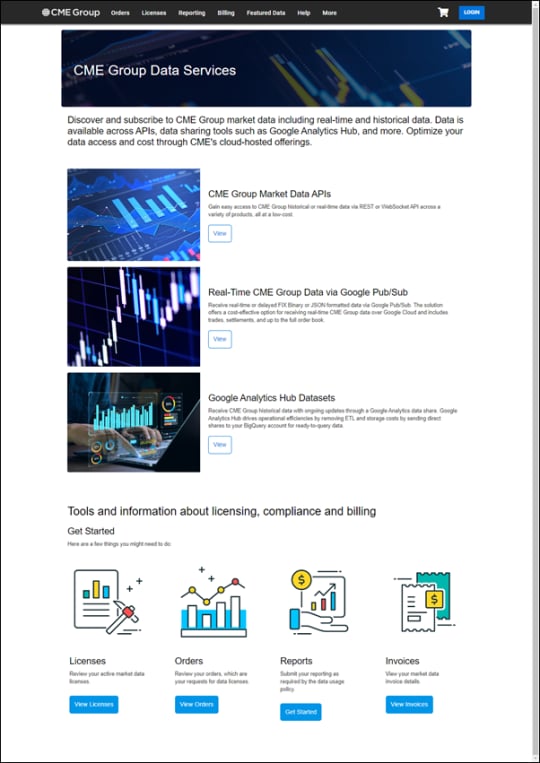
Market data is available across the following CME Group APIs and data sharing tools:
- CME Group Market Data APIs: Gain easy access to CME Group historical or real-time data via REST or WebSocket API across a variety of products.
- Real-Time CME Group Data via Google Pub/Sub: Receive real-time CME Group data, including trades, settlements, and full order book over Google Cloud.
- Google Analytics Hub Datasets: Receive CME Group historical data with ongoing updates through a Google Analytics data share.
Customers also use the CME Group Data Services Portal to:
- Request licensing of Real Time/Delayed /End of Day CME Group, CME Group Benchmark Administration and S&P and Dow Jones indices data.
- Upgrade to a CME Group Information License Agreement (ILA). CME Group’s updated Agreement is tailor-made to your needs, with clear policies and responsibilities and updated Privacy provisions that complement regulatory changes.
- View licenses and invoice details.
- Review data license order status.
- Add new services, and add/remove affiliates and Service Facilitators.
- Add/remove contacts, update billing addresses, or add/update your billing account.
- Report as required under your license agreement.
Further details about CME market data licensing policies are available in the Market Data Policy Education Center.
- Register for Access to CME Group Data Services Portal
- View the portal's web site https://dataservices.cmegroup.com/.
- Select Register from the Menu Bar.
- Enter the appropriate data in the fields and select Submit. All fields with * are required. For additional information, see the Web Help on CME Group Login.

- Follow instructions as presented to activate the CME Group Login account.
- Once you create your CME Group Login, contact your CME Account Manager to enable your access.
- The data will be reviewed by your CME Account Manager and they will grant access to the CME Group Data Services Portal.


